On this page
Making AI Memory Capture More Reliable
 Ammar Najjar
 AI-generated image
In Building a Local AI Memory Repository, I established a Markdown repository as a persistent, agent-accessible knowledge source. Agents could read from it and update it, and it gave me a stable place to store what mattered across sessions. The approach worked, but memory maintenance still depended on agents remembering to perform additional steps during ordinary conversations.
Separating Memory from the Conversation
In the previous setup, the conversational agent carried both responsibilities at once: completing the user’s task and maintaining the memory repository. It had to recognize useful information during a conversation, decide whether to preserve it, and update the repository, all while trying to solve the immediate problem.
When the agent concentrated on the immediate task, useful information could remain unrecorded. The repository provided persistent storage, but there was no separate process responsible for collecting conversation activity and evaluating it for long-term use.
The conversational agent stays focused on completing the task. Tool-specific integrations capture supported conversation events exposed by each AI tool and pass them into a shared workflow. That workflow evaluates what was said, identifies what deserves preservation, and updates the repository. The separation means the agent no longer needs to pause mid-conversation to decide whether something is worth remembering.
How the New Memory Flow Works
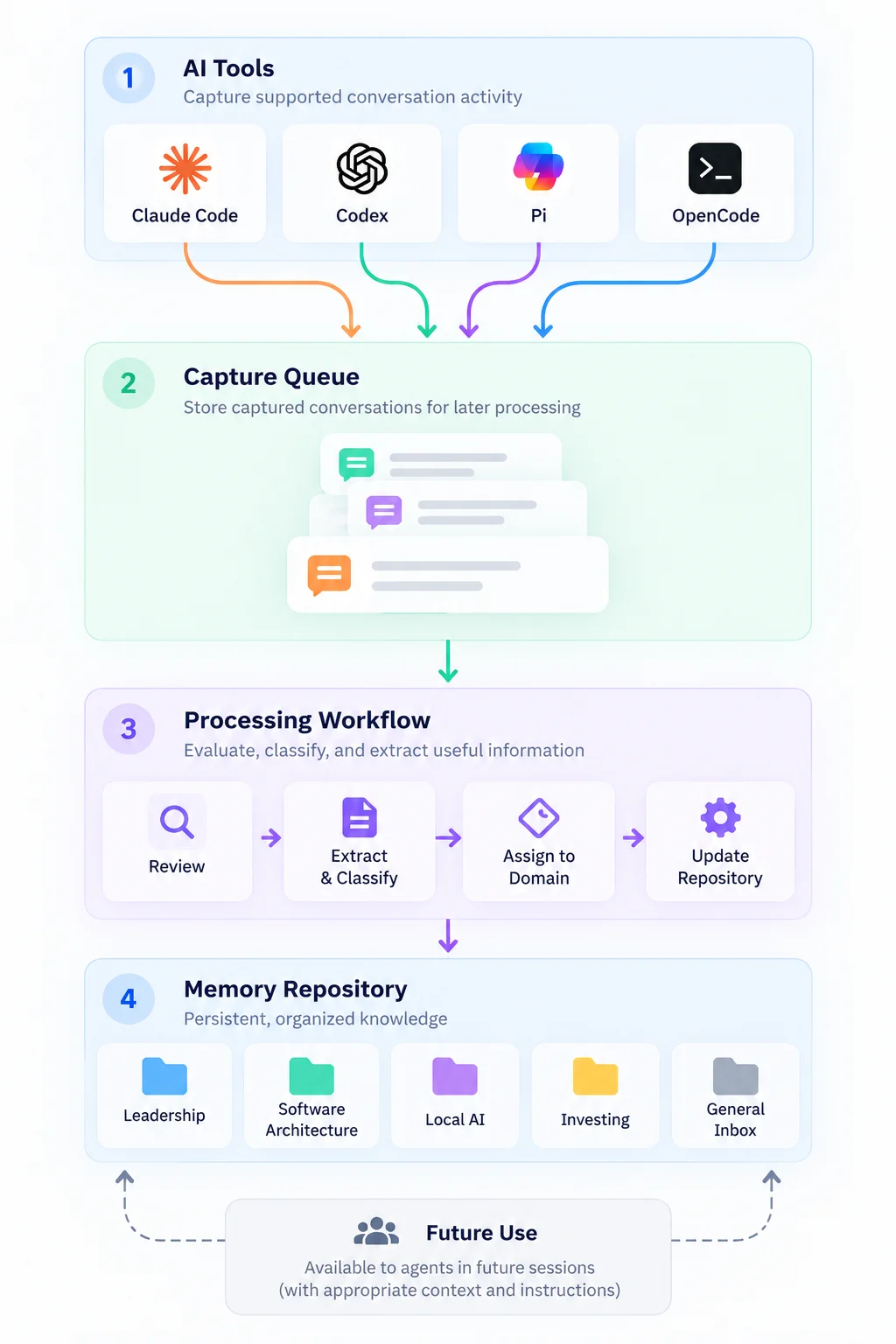
The architecture consists of four components: capture integrations, a shared queue, a processing workflow, and the persistent memory repository. The processing workflow can route information into a specific memory domain or a general inbox for later review.
 AI-generated image
Each step follows the arrows from the diagram:
-
A conversation happens. A conversation about an architectural decision or leadership situation may produce observations, trade-offs, or conclusions worth preserving.
-
A capture integration records supported activity. The integrations vary depending on what each AI tool exposes. They all share one responsibility: observe the supported conversation events and pass the user prompt and assistant response text to the shared queue. The integration does not decide what is valuable.
-
The shared queue holds the text temporarily. This is where captured information sits while waiting to be processed, making pending work visible. The workflow allows selected conversations to be excluded from memory processing.
-
A separate processing worker evaluates queued text. Under normal conditions, processing is triggered when a conversation turn completes. The worker picks up the queued conversation, identifies whether it contains an observation, a decision, a lesson, or other useful context, and routes it. If the information belongs to a known memory domain, it is added to the memory repository. If it cannot be classified into a specific domain, it goes into a general inbox for manual review. Interrupted or failed processing can be retried or flagged for review.
-
The memory repository receives processed information. The repository remains the shared source of persistent knowledge from the previous article. Whether a future agent actually retrieves a given piece of information during a specific session depends on that agent’s context and instructions.
Why I Chose This Design
Capturing conversation activity before evaluating its long-term value allows memory processing to happen independently of the conversational task. It also means temporarily retaining information that may eventually be discarded.
The repository and queue stay on my machine, but that does not by itself determine where captured information is processed. The worker sends queued conversation context to the command line tool for the AI tool that captured it. Whether a local model processes that context on my machine or a hosted model receives it depends on how that tool is configured. I avoid placing sensitive source material in the persistent memory repository and make it available selectively when a task requires it. The processing destination therefore determines what information I allow into that workflow.
Different AI tools expose different capabilities and conversation events. Separate integrations feeding a common workflow allow the capture mechanism to respect each tool’s capabilities while keeping downstream processing consistent. Supporting several tool-specific integrations introduces maintenance work, while a common processing workflow allows information from different tools to be handled consistently.
Running processing in a separate worker introduces a delay before information becomes available in persistent memory, while keeping the workflow independent and easier to inspect.
What Changed in Practice
When tool integrations capture supported events, they do so without requiring the conversational agent to flag anything. The agent can stay focused on completing its assigned work. Capture coverage depends on the events each tool exposes, while captured information enters a processing workflow independently of whether the conversational agent recognized its value.
The queue and processing records make captured information, pending work, and recorded processing outcomes inspectable. The practical value is being able to understand the state of memory maintenance without reconstructing it from previous conversations. I can see which captured information is waiting, what has been processed, and what requires attention.
Conversation handling, capture, processing, and persistent storage now have distinct responsibilities. Different AI tools can contribute information through their respective integrations, while the downstream processing workflow remains common. This separation makes the architecture easier to reason about and maintain. The integrations can evolve independently while continuing to feed a common processing workflow.
Conclusion
Separating capture from the conversational agent’s work gave me a more consistent and observable way to maintain persistent memory. The next challenge is ensuring that stored knowledge becomes available in future sessions where it can inform subsequent work.
How much automated capture would feel comfortable in your workflow, and what kinds of conversations would you want a system to record or leave out?