On this page
Keeping Knowledge Useful: What I Learned from 1,000+ Obsidian Notes
 Ammar Najjar · Posted on October 11, 2026 · 8 min readproductivity
 AI-generated image
I recently took a closer look at my Obsidian vault, a collection that has grown steadily over time. It contained more than 1,000 notes and supporting Markdown files on books, conversations, technical knowledge, decisions, and writing. Among them, I found tags with overlapping meanings, book notes with incomplete metadata, several decisions stored together in a long file, and navigation pages containing little more than a heading.
I could see specific improvements to make, yet the findings also raised a broader question about the system. Information could be present in a note without appearing in the views I used to find it. An author appeared in a filename but was missing from the field a dashboard displayed. A folder had a navigation page, but that page offered little help. I needed to look at how I organized the notes and whether that still helped me use them.
Choosing a Foundation I Could Work With
My search for a knowledge management system first took me to Notion. What drew me to Obsidian was the ability to keep the collection as readable files I could work with directly, even outside the application. For knowledge I wanted to revisit years later, that gave me a foundation I could inspect, maintain, and keep in version control.
In Obsidian, notes live in Markdown files inside a vault. Mine includes folders, attachments, and configuration, and I keep it in Git so changes have a history. Obsidian and its plugins provide ways to connect and explore the material, while the text remains accessible through other editors and tools.
With direct access to the files, I still needed to decide what each kind of note should contain and how I would find it again.
To make this concrete, I published a small fictional demo vault that mirrors this structure. All people, squads, books, and decisions in it are invented, so you can open it in Obsidian and try the templates and queries described below.
Giving Different Knowledge the Structure It Needs
My broad organization separates work, personal material, and daily notes, with places for books, people, squads, meetings, technical notes, ideas, and writing. Folders give me familiar starting points, but the material crosses those boundaries. A leadership idea may come from a book, and a decision may involve a squad and several people. A folder hierarchy cannot easily represent all those connections.
Templates help with a different problem: recurring notes need recurring details. My book template includes title, author, publication information, rating, and reading status, followed by sections for a summary, big ideas, application, and quotations. I particularly appreciate the application section because it prompts me to consider where an idea might be useful in work and life.
For one-to-one meetings, the template includes well-being, career development, two-way feedback, work, collaboration, recognition, and an open agenda, followed by action items and follow-ups. Those prompts give the conversation a starting shape and leave a consistent place for what needs attention afterwards. Each meeting remains a separate record, identified by its person and date and connected to that person’s page.
I use Templater to insert dates and rename files in certain templates, including dated meetings and weekly reviews. This saves me from repeating the naming steps, though I still need to write the note itself.
Tags and properties help me identify and group notes across folders. Labels such as book, people, meeting, 1on1, decision, and leadership provide a shared vocabulary. Properties hold specific values such as an author, date, reading status, or decision status. Links identify the people, squads, and sources involved: a squad can link to its people, a decision to its squad, and a leadership tip to a book.
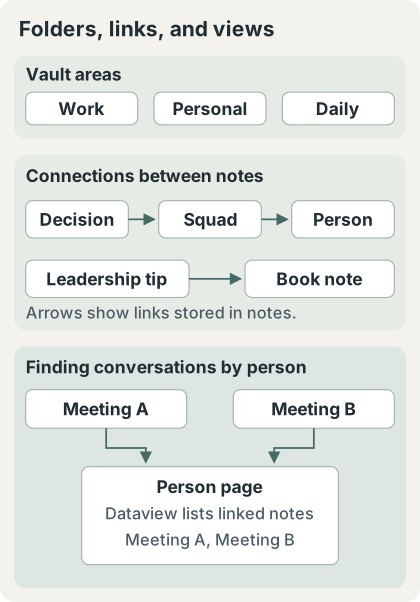
This arrangement lets a book stay in the reading collection while its ideas become relevant elsewhere. A link from a leadership tip to its source gives me a route back to the reading note, including the summary and surrounding ideas. I can preserve the relationship explicitly without reorganizing the folders whenever a note becomes useful in another context.
Bringing Existing Notes into Useful Views
Dataview makes these conventions useful beyond the individual record. I use it to collect notes by tags, properties, location, or links, so the same files can appear in several views without separate copies.
Some person pages list notes linking to them, sorted by modification time. A generalized version is:
LIST
FROM [[Person]]
SORT file.mtime DESC
Dataview selects pages that link to the named note; here, Person stands for the relevant person’s page. This brings related conversations together while leaving each note in its own file. It depends on those records containing the person link, and the ordering reflects when files were modified, rather than when meetings occurred.
My reading dashboard offers views for currently reading, recently added, top-rated, unrated, and books grouped by status. The currently-reading query is:
TABLE author AS "Author", created AS "Added"
FROM #book
WHERE status = "reading"
SORT created DESC
It selects notes tagged book with a status of reading, displaying their author and recorded created property. Updating the status changes whether a book appears in this view, while its summary and ideas remain in the original note.
Folder pages combine curated links with recent-activity queries, and a decision index shows date, area, squad, and status. These views are only as complete as the information I record in the underlying notes.
Tasks and follow-ups stay where they arise, as checkboxes in meeting and daily notes, and the Tasks plugin collects them across the vault. A pinned Master Task List gathers the open ones from my daily and work notes into a single view, grouped by source note, which I check regularly to prioritize my time:
TASK
WHERE !completed AND (startswith(file.path, "Daily/") OR startswith(file.path, "Work/"))
SORT file.mtime DESC
GROUP BY file.link
The weekly review then reconciles them into done, in progress, and next, so open items get revisited regularly instead of lingering silently in old notes.
What the Review Revealed
The review showed where information was missing from those views. Some book notes had author names in their filenames but empty author fields. I could recognize the author when browsing files, yet the table could not display it. Adding the name to the property, where the source confirms it, would make it available in the dashboard too.
Several tags had similar meanings, making it less clear which one to use. Simplifying that vocabulary would make both tagging a new note and choosing tags for a query more straightforward. I want to keep distinctions that help me find material, rather than retain every label that has accumulated.
Several decisions shared a long file, although I wanted to retrieve them individually. Giving each decision its own record would keep its reasoning, date, area, squad, and status together and let it appear separately in the index. The way I stored them needed to reflect how I wanted to revisit them.
Some navigation pages contained only headings. Adding selected links or a view of recent activity would give me a useful starting point when exploring those folders.
I added links between leadership tips and their source books. The ideas were already there, and the links gave me a direct route back to their sources.
These findings helped me see how choices made when recording information affect what I can find later. An empty author property leaves a dashboard incomplete, a missing person link keeps a conversation out of that person’s view, and several decisions in one file cannot appear as separate records in a page-level query. I do not know how every gap arose, but each points to a specific improvement.
That gives me a reason to review the templates alongside older notes. If a view needs a property or link, the template should remind me to include it. Filling gaps in existing notes also helps me decide what to ask for when creating new ones. I want those changes to make recording useful details easier without adding unnecessary work.
Keeping the System Useful as It Changes
Maintaining this vault has made me more willing to revisit its conventions. When a dashboard is incomplete or a navigation page offers little help, I can look at both the notes already there and how I create new ones. That helps me decide whether to adjust a template, fill a field, add a link, or improve a page.
Markdown files and Git remain the foundation of my setup. As the collection grows, I expect to keep refining its organization, metadata, and connections so the knowledge I preserve remains useful.
As your own notes have grown, which conventions have you changed, and what helped you recognize that they needed attention?
I would be interested to hear about your experience in the comments.