On this page
- The Big Picture
- Toolchain: Bun Instead of npm
- Astro: Static by Default
- JavaScript Delivery
- Loading Performance and Core Web Vitals
- Visual Design
- Content Collections
- Routing and Pages
- Internationalization
- Image Handling
- Optimization and Responsive Variants
- Automatic Dimension Injection
- SEO and Discoverability
- HTML Head
- Sitemap
- RSS Feeds
- robots.txt
- llms.txt
- Deployment: GitHub + Cloudflare Pages
- CI: GitHub Actions
- HTTP Headers
- Redirects
- Comments: Giscus
- The Full Picture
- Where Does AI Fit In?
- Your Turn
How This Website Works: A Technical Look at the Stack
 Ammar Najjar
 AI-generated image
In a companion article, I wrote about why I rebuilt this website with Astro and how that decision grew into a much larger project. That article was about the journey and the thinking. This one is about the outcome: how the website actually works, every layer from writing a post to it appearing in a reader’s browser.
The Big Picture
At its core, the website is a static site. Every page is generated at build time and shipped as plain HTML, CSS, and minimal JavaScript. There is no server rendering requests, no database, and no runtime infrastructure to maintain. What Cloudflare serves to readers is exactly what Astro produced during the build.
┌──────────────────────────────────────────────────────────────┐
│                         Author                               │
│  Write Markdown/MDX  →  git push  →  GitHub                  │
└───────────────────┬────────────────────────┬─────────────────┘
                    │ PR (parallel)          │ merge to main
                    ▼                        ▼
       ┌────────────────────┐   ┌──────────────────────────────────┐
       │   GitHub Actions   │   │        Cloudflare Pages          │
       │   build check only │   │  build → deploy to CDN           │
       │   (no deploy)      │   │  PR    → preview at *.workers.dev│
       └────────────────────┘   └──────────────┬───────────────────┘
                                               │
                                               ▼
                                       Reader's Browser
                                  (HTML + CSS + ~0 JS per page)
That simplicity is intentional. Static sites are fast, cheap, and straightforward to reason about. The toolchain around them can still be interesting though, and that’s what this article explores.
Toolchain: Bun Instead of npm
The project requires Bun >=1.0.0 as its JavaScript runtime and package manager. Bun replaced npm during the migration, and the difference in day-to-day experience is noticeable. Installation is faster, the lockfile (bun.lock) is more compact, and the commands feel snappier for a project of this size.
The package.json scripts are straightforward:
{
  "scripts": {
    "dev": "astro dev",
    "build": "astro build",
    "preview": "astro preview",
    "deploy": "bun run build && wrangler pages deploy dist/ --project-name=website"
  }
}
bun run dev starts a local dev server with hot module reloading. bun run build produces the static output in dist/. The deploy script is a local escape hatch: in practice, production deploys happen automatically through Cloudflare Pages’ git integration rather than manually.
Astro: Static by Default
Astro is the framework responsible for transforming content and components into the pages that ship to readers. The configuration reflects a clear set of priorities:
// astro.config.mjs
export default defineConfig({
  site: "https://ammar-najjar.com",
  trailingSlash: "always",
  output: "static",
  markdown: {
    shikiConfig: { theme: "css-variables" },
    rehypePlugins: [rehypeImgDimensions],
  },
  integrations: [
    mdx(),
    sitemap({
      filter: page => !page.includes(".xml") && !page.includes("/404/"),
    }),
  ],
});
output: 'static' means the build produces pure HTML files. The site runs entirely as static assets on Cloudflare Pages, with no server adapter needed.
JavaScript Delivery
One of Astro’s core design principles is shipping zero JavaScript by default. Every .astro component renders to static HTML at build time and sends nothing to the browser unless you explicitly opt in with a client:* directive. This site uses none of those directives. Every component is purely server-rendered HTML.
The only JavaScript that actually ships to readers is:
- A small inline script in
<head>that readslocalStorageand appliesdata-themebefore first paint, preventing a flash of wrong theme - A script that wires up the dark mode toggle button and the locale switcher
- The Giscus comment widget, loaded lazily only when a reader scrolls to the bottom of a post
That’s it. No framework runtime, no hydration overhead, no component tree bootstrapping in the browser. The previous site (Docusaurus, built on React) shipped a full React runtime and component bundle on every page regardless of whether any interactivity was needed. The difference in bundle size is significant: most pages on this site deliver under 10KB of JavaScript, compared to the 100-200KB React bundle that loaded unconditionally before.
Loading Performance and Core Web Vitals
Core Web Vitals measure three things that readers actually feel: how fast the largest visible element loads (LCP), how much the layout shifts while loading (CLS), and how quickly the page responds to interaction (INP). Each one is directly affected by architectural decisions made elsewhere in this stack.
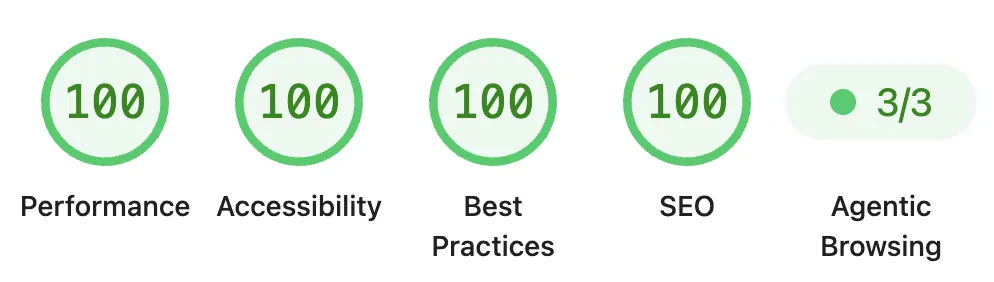
This score confirms the impact of the architectural decisions: minimal JavaScript delivery, no render-blocking resources, and optimized images ensure that every page loads almost instantly.
- LCP: the hero image on a post.
BaseLayoutaccepts apreloadImageprop that emits<link rel="preload" fetchpriority="high">, telling the browser to fetch it at highest priority before parsing the page body. Cloudflare’s CDN serves it from an edge node close to the reader. - CLS: prevented by three things:
widthandheightattributes injected at build time (browser reserves space before the image loads), system fonts (no web font swap), and no client-side rendering that inserts elements after initial paint. - INP: with no JavaScript framework running, there is no event loop contention from component reconciliation or hydration. The only scripts present are small and focused.
Syntax highlighting uses Shiki with a css-variables theme. Rather than baking a fixed color scheme into the output, all token colors are expressed as CSS custom properties. This makes switching between light and dark mode a pure CSS concern: change the variable values, and the code blocks follow without any JavaScript.
Visual Design
The visual layer is entirely CSS, no framework. All colors are defined as CSS custom properties on :root, with a [data-theme='dark'] override block that swaps every variable when the user activates dark mode:
:root {
  --color-bg: #ffffff;
  --color-text: #1a1a2e;
  --color-primary: #003366;
  --font-sans: system-ui, -apple-system, sans-serif;
  --font-mono: "SF Mono", "Fira Code", monospace;
  --max-width: 900px;
}

[data-theme="dark"] {
  --color-bg: #0d1117;
  --color-text: #c9d1d9;
  --color-primary: #3399ff;
}
The toggle reads localStorage on page load, falls back to prefers-color-scheme, and writes the data-theme attribute to <html>:
const saved = localStorage.getItem("theme");
const prefersDark = window.matchMedia("(prefers-color-scheme: dark)").matches;
if (saved === "dark" || (!saved && prefersDark))
  document.documentElement.setAttribute("data-theme", "dark");
That is the only JavaScript involved in theming. Typography uses system fonts throughout: no web fonts downloaded, no render-blocking requests, no layout shift. Layout is constrained to --max-width: 900px and adapts to smaller screens via media queries. Images are set to max-width: 100%; height: auto globally, making every image responsive without per-image handling.
Content Collections
Astro’s content collections are the backbone of the content layer. Every post lives in src/content/ as a Markdown or MDX file, and each collection is described by a Zod schema that validates frontmatter at build time:
// src/content.config.ts
const blogSchema = z.object({
  slug: z.string(),
  title: z.string(),
  authors: z.string(),
  date: z.coerce.date(),
  tags: z.array(z.string()).default([]),
  description: z.string().optional(),
  image: z.string().optional(),
  imageStyle: z.string().optional(),
  aiGenerated: z.boolean().default(false),
  draft: z.boolean().default(false),
});
If a post’s frontmatter is missing a required field or has the wrong type, the build fails. That’s intentional: a failed build beats a published post with broken metadata.
The content directories map directly to locale variants:
src/content/
  blog/          ← English posts
  blog-de/       ← German posts
  blog-ar/       ← Arabic posts
  books/         ← English reading notes
  books-de/      ← German reading notes
  books-ar/      ← Arabic reading notes
Each locale’s content is its own collection registered under a different name, all sharing the same schema. The collectionName() helper in src/i18n/index.ts handles the naming convention:
export function collectionName(type: ContentType, locale: Locale): string {
  if (locale === "en") return type;
  return `${type}-${locale}`;
}
So collectionName('blog', 'ar') returns 'blog-ar', and the pages layer queries the right collection based on which locale it is rendering for.
The schema’s tags and authors fields drive the discovery layer.
Tags serve two purposes. For readers, they are navigation: a reader who arrives at a post about Cloudflare and wants more on that topic can follow the tag to a dedicated listing page at /blog/tags/cloudflare/ showing everything tagged the same way. For search engines, tag pages are topic-focused URLs with their own canonical addresses, which concentrates relevance signals around a subject rather than scattering them across unrelated posts. Every tag used in any post automatically gets its own page at build time via getStaticPaths(), with no manual curation needed.
The authors field links posts to author profiles at /authors/:author/. Pagination at /blog/page/:n/ keeps the main blog index from growing unbounded as the archive grows. Together these give readers multiple paths into the content beyond a single chronological feed.
Routing and Pages
Astro’s file-based routing translates directory structure directly to URLs. The src/pages/ tree mirrors the URL structure of the site:
src/pages/
  index.astro              → /
  about.astro              → /about/
  blog/[...slug].astro     → /blog/:slug/
  blog/tags/[tag].astro    → /blog/tags/:tag/
  blog/page/[page].astro   → /blog/page/:n/
  books/[...slug].astro    → /books/:slug/
  authors/[author].astro   → /authors/:author/
  rss.xml.js               → /rss.xml
  ar/                      → /ar/* (Arabic locale mirror)
  de/                      → /de/* (German locale mirror)
Dynamic routes like [...slug].astro use getStaticPaths() to enumerate every post at build time:
export async function getStaticPaths() {
  const posts = await getPublishedCollection("blog");
  return posts.map(post => ({
    params: { slug: post.id },
    props: { slug: post.id, id: post.id },
  }));
}
At build time Astro calls getStaticPaths() for every dynamic page, collects all the parameter combinations, and renders each one to a static HTML file. The result is a dist/ directory that looks exactly like the URL structure of the live site.
Internationalization
The site supports three locales: English (default), German (/de/), and Arabic (/ar/). The implementation is explicit rather than magical: no automatic locale detection, no server-side redirect based on browser headers. Each locale is a parallel directory of pages that queries its own collection.
┌───────────────┐    ┌───────────────┐    ┌───────────────┐
│   /blog/      │    │  /de/blog/    │    │  /ar/blog/    │
│  (English)    │    │  (German)     │    │  (Arabic)     │
└───────┬───────┘    └───────┬───────┘    └───────┬───────┘
        │                    │                    │
        ▼                    ▼                    ▼
 blog collection     blog-de collection   blog-ar collection
A language switcher in the navigation lets readers change locale manually. The BaseLayout accepts a dir prop ('ltr' or 'rtl') so that the Arabic locale gets correct text direction and layout mirroring at the HTML level without any client-side JavaScript.
Locale helpers keep URL construction consistent throughout the codebase:
export function getDir(locale: Locale): "ltr" | "rtl" {
  return locale === "ar" ? "rtl" : "ltr";
}

export function getPrefix(locale: Locale): string {
  return locale === "en" ? "" : `/${locale}`;
}
English paths are unchanged; German and Arabic paths gain their locale prefix.
Image Handling
Images live in two places. Content images (post headers, diagrams, screenshots) are co-located with their post inside src/content/, which means each post directory is self-contained:
src/content/blog/every-camera-tells-a-story/
  index.md
  header.webp
Static images (profile photo, social icons, favicons) live in public/img/ and are copied to the output as-is.
Optimization and Responsive Variants
Content images referenced in components use Astro’s built-in <Image> component from astro:assets. At build time it automatically optimizes the source file, converts it to a modern format (WebP by default), and generates a srcset with multiple size variants so the browser downloads only the resolution it actually needs:
import { Image } from 'astro:assets';

<Image
  src={headerImage}
  alt={title}
  width={120}
  loading="lazy"
/>
The component also emits width and height attributes on the output <img>, which the browser uses to reserve space before the image loads, eliminating layout shift.
Automatic Dimension Injection
For images written directly in Markdown (rather than via a component), a custom Rehype plugin handles dimension injection at build time. It reads width and height from the actual file using Sharp and injects them onto every <img> element that references a file in public/img/:
// src/plugins/rehype-img-dimensions.mjs
async function getDimensions(src) {
  if (!src || !src.startsWith("/img/")) return null;
  const filePath = join(projectRoot, "public", src);
  const { width, height } = await sharp(filePath).metadata();
  return width && height ? { width, height } : null;
}
The plugin handles both standard Markdown image syntax () and raw HTML <img> tags written inline. The result is the same as the <Image> component: the browser knows the dimensions before the image arrives, and layout shift is eliminated without any manual attribute management.
SEO and Discoverability
Several systems work together to make content findable.
HTML Head
BaseLayout.astro is the single layout component that wraps every page. It manages the <head> with a consistent set of tags:
<title>{fullTitle}</title>
<meta name="description" content="{description}" />
<meta property="og:title" content="{fullTitle}" />
<meta property="og:image" content="{image}" />
<link rel="canonical" href="https://ammar-najjar.com{pathname}" />
<link rel="alternate" hreflang="{locale}" href="..." />
<link rel="alternate" type="application/rss+xml" href="/rss.xml" />
A single layout component handling all of this ensures consistency: no post ships without a title, no page is missing its canonical URL.
Title and description appear directly in search results and social link previews. Open Graph tags control how a shared link looks on social platforms; without them, platforms guess, often poorly. Canonical URL is an authoritative signal to search engines about the definitive address of each page, preventing ambiguity from trailing slashes or redirects. hreflang tells search engines which locale to surface for which audience; without it, a German reader might land on the English version even though the German version exists. RSS alternate is included on every page so feed readers can discover the subscription link without requiring readers to hunt for it.
Sitemap
A sitemap hands crawlers a complete list of every URL on the site rather than relying on them to follow links. For a multilingual site this matters more than for a simple blog: the English, German, and Arabic versions of each post live at separate URLs, and a crawler following only internal links might not reach all of them.
The @astrojs/sitemap integration generates sitemap-index.xml at build time from every static page, filtering out 404 pages and XML URLs. It is referenced in robots.txt and in the Link response header on every page, so crawlers find it regardless of how they arrive.
A redirect handles the conventional path:
/sitemap.xml → /sitemap-index.xml (301)RSS Feeds
The site publishes one RSS feed per locale (/rss.xml, /de/rss.xml, /ar/rss.xml): blog posts and reading notes merged, sorted by date descending
Each is generated by an Astro endpoint (rss.xml.js) that queries the published collection and returns a properly formatted feed using @astrojs/rss.
robots.txt
User-agent: *
Allow: /
Content-Signal: ai-train=no, search=yes, ai-input=yes
Sitemap: https://ammar-najjar.com/sitemap-index.xml
robots.txt is one of the oldest conventions on the web and the first thing every crawler checks. The file here opens the entire site to all crawlers, points to the sitemap, and adds a Content-Signal directive. That last part is a proposed extension for expressing AI licensing intent: ai-train=no asks that the content not be used to train models; ai-input=yes permits use in retrieval-augmented generation, where a model is answering a specific question rather than absorbing content into its weights. Not legally enforceable, but it states intent clearly in a place crawlers already look.
llms.txt
robots.txt tells crawlers what they may access. llms.txt tells language models what the site actually contains.
When an AI assistant is asked about a person or a website, it can either recall something from training data (frozen in time, potentially inaccurate) or crawl the site (slow, expensive). llms.txt offers a third option: a structured plain-text summary at a well-known path covering the author’s identity, content categories, and available languages. llms-full.txt is the expanded variant, organized by topic with descriptions of individual posts. A model that reads either file first can answer accurately without fetching every page. The convention is still emerging, but the problem it solves is real.
Deployment: GitHub + Cloudflare Pages
The publishing workflow connects three pieces: a local text editor, GitHub as version control, and Cloudflare Pages as the build and delivery platform. The story of why and how the hosting migrated from GitHub Pages to Cloudflare, including the domain registrar evaluation and the migration pitfalls, is covered in a separate article.
┌───────────────┐     git push      ┌──────────────────────────────┐
│  Local        │ ────────────────► │  GitHub                      │
│  (write +     │                   │  main branch → production    │
│   commit)     │                   │  PR branch  → preview build  │
└───────────────┘                   └───────┬──────────────┬───────┘
                                            │ PR           │ merge to main
                                            ▼              ▼
                             ┌────────────────────────────────────────────────────┐
                             │  Cloudflare Pages                                  │
                             │  bun install + bun run build                       │
                             │                                                    │
                             │  PR   → preview at *.workers.dev                   │
                             │         (Actions runs build check in parallel)     │
                             │  main → deploy dist/ to production CDN             │
                             └────────────────────────────────────────────────────┘
Cloudflare Pages watches the GitHub repository. Pushing to main triggers a production build and deployment. Opening a pull request triggers a preview build: a separate deployment at a unique URL, so changes can be reviewed visually before merging.
CI: GitHub Actions
There is a single GitHub Actions workflow, test-deploy.yml, which runs on every pull request against main:
steps:
  - uses: actions/checkout@v4
  - uses: oven-sh/setup-bun@v1
  - run: bun install --frozen-lockfile
  - run: bun run build
Its only job is to verify that astro build succeeds. It does not deploy anything. If the build fails on a PR, the PR is blocked before a broken deployment can reach Cloudflare Pages. If the build passes, Cloudflare Pages handles the actual deployment as a separate step triggered by its own git integration. Every branch also gets a live preview deployment on a *.workers.dev subdomain automatically, so changes can be reviewed in a real browser at a shareable URL before merging.
HTTP Headers
Cloudflare reads public/_headers to apply response headers to every deployed URL. These file-based headers complement the dashboard settings in how I configure Cloudflare. The strategy mirrors standard static site cache practice:
/_astro/*
  Cache-Control: public, max-age=31536000, immutable

/img/*
  Cache-Control: public, max-age=31536000, immutable

/*
  Cache-Control: public, max-age=3600, s-maxage=86400, stale-while-revalidate=86400
  X-Content-Type-Options: nosniff
  X-Frame-Options: DENY
  Referrer-Policy: strict-origin-when-cross-origin
  Permissions-Policy: geolocation=(), microphone=(), camera=()
Astro outputs hashed filenames for all bundled assets (e.g. /_astro/main.Bx9qKt2a.css). Because the filename changes whenever the content changes, these files can be cached indefinitely (max-age=31536000, immutable) without any risk of readers seeing stale CSS or JavaScript. HTML pages, which are not content-hashed, use a shorter max-age of one hour with a stale-while-revalidate window so that Cloudflare’s CDN can serve slightly stale pages while revalidating in the background.
Security headers are applied globally: X-Content-Type-Options prevents MIME sniffing, X-Frame-Options: DENY blocks the site from being embedded in iframes, and Permissions-Policy explicitly disables access to geolocation, microphone, and camera.
Redirects
public/_redirects handles permanent redirects for URLs that changed during the migration. The old site had separate /experience/ and /skills/ pages; those were removed and their content merged into /about/. The redirects preserve any inbound links and pass search engine signals to the new URLs:
/sitemap.xml         /sitemap-index.xml  301
/blog/archive/       /blog/              301
/experience/         /about/             301
/ar/experience/      /ar/about/          301
/de/experience/      /de/about/          301
/skills/             /about/             301
/ar/skills/          /ar/about/          301
/de/skills/          /de/about/          301
These ensure that links from other sites pointing to old URLs still resolve correctly after restructuring, and that any search engine index entries for old paths pass their signals to the new ones.
Comments: Giscus
Comments are powered by Giscus, which stores discussions in a GitHub repository’s Discussions feature. No separate comment database or third-party platform is involved. Readers need a GitHub account to comment, which suits the technical audience this site tends to attract.
The GiscusComments component loads the Giscus script lazily using an IntersectionObserver:
const observer = new IntersectionObserver(
  ([entry]) => {
    if (entry.isIntersecting) {
      loadGiscus();
      observer.disconnect();
    }
  },
  { rootMargin: "200px" },
);
The comment widget is only initialized when the reader scrolls within 200px of the bottom of the page. This avoids loading an external script on every page view. Only readers who actually reach the end of an article trigger the network request.
The Full Picture
┌─────────────────────────────────────────────────────────────────┐
│  Writing                                                        │
│  src/content/blog/<slug>/index.md  (Markdown + frontmatter)     │
│  src/content/blog-de/<slug>/index.md  (German)                  │
│  src/content/blog-ar/<slug>/index.md  (Arabic)                  │
└──────────────────────────┬──────────────────────────────────────┘
                           │ validated by Zod schema at build
                           ▼
┌─────────────────────────────────────────────────────────────────┐
│  Build  (bun run build)                                         │
│  ├─ Astro collects all content collection entries               │
│  ├─ getStaticPaths() generates one path per post × locale       │
│  ├─ <Image> optimizes + generates srcset for content images     │
│  ├─ Rehype plugin injects img width/height via Sharp            │
│  ├─ Shiki highlights code (CSS variables, no JS)                │
│  ├─ @astrojs/sitemap writes sitemap-index.xml                   │
│  └─ dist/ contains flat HTML files matching URL structure       │
└──────────────────────────┬──────────────────────────────────────┘
                           │ git push to main
                           ▼
┌─────────────────────────────────────────────────────────────────┐
│  Cloudflare Pages                                               │
│  ├─ Runs same build (bun install + bun run build)               │
│  ├─ Deploys dist/ to global CDN edge                            │
│  ├─ Applies _headers (cache + security)                         │
│  └─ Applies _redirects (legacy URL preservation)                │
└──────────────────────────┬──────────────────────────────────────┘
                           │
                           ▼
┌─────────────────────────────────────────────────────────────────┐
│  Reader's browser                                               │
│  ├─ HTML from CDN edge (sub-100ms globally)                     │
│  ├─ CSS with Shiki CSS variables for theme-aware code blocks    │
│  ├─ Hashed assets cached for one year                           │
│  └─ Giscus loaded on scroll (comments, no eager JS)             │
└─────────────────────────────────────────────────────────────────┘
Every piece of this architecture reflects a version of the same principle: do as much as possible at build time, deliver as little as possible at runtime, and keep the infrastructure simple enough to understand completely. Astro handles the build, Cloudflare handles the delivery, and the gap between writing a post and having it online is exactly one git push.
Where Does AI Fit In?
You might be wondering: in 2026, where is the AI in all of this? The short answer is that AI is not part of the website’s runtime stack, there are no AI APIs called at build time, no machine learning models embedded in the page, and no chatbot widgets. But AI played a significant role in how the site was built.
I used a spec-driven development workflow powered by a local AI setup: LM Studio as the model runtime, OpenCode as the agentic coding assistant, and Qwen 3.5 as the local model running on a MacBook Pro. The idea is simple: before writing any code, describe what you want in natural language, let the AI agent explore the codebase, plan the approach, and then implement it, all without leaving the terminal and without sending a single line of code to a cloud API.
This approach shaped several decisions in the architecture you see above. Content collections, the i18n helpers, the Rehype plugin, the deployment pipeline, all of these were developed through spec-driven conversations with a local model. The AI handled repository exploration, generated boilerplate, suggested architectural patterns, and helped write and review the accuracy of this article. For a deeper look at which models and tools actually work on constrained hardware, and why agent capability matters more than coding benchmark scores, see my companion article on setting up a local AI development environment.
Your Turn
If you run a personal site, I’m curious about the choices you made. Static or server-rendered? Self-hosted or managed? Did you optimize for simplicity, for features, or for something else entirely? What would you do differently if you were starting from scratch today?
Drop a comment below. I read every one.