On this page
Portfolio: a lightweight personal portfolio tracker
 Ammar Najjar · Posted on December 12, 2025 · 6 min readfrontend
This post explains the design and implementation of a small browser-first portfolio tracker. It focuses on requirements, the challenges encountered, and how the final solution addresses them, including code snippets that illustrate the state handling, caching, and chart interaction.
Goals and requirements
These goals were collected before coding:
- Privacy-first: keep user data local by default; no server-side storage unless the user opts in.
- Low network usage: avoid redundant requests; be friendly to metered or slow connections.
- Responsive UI: range selections and interactions should feel immediate, even when network calls are needed in the background.
- Robustness: accept imported or hand-edited JSON and avoid re-fetching data unnecessarily.
- Testable: core behaviors must have unit tests to prevent regressions.
Implementation challenges
Several practical issues emerged while building the app:
-
Range caching vs. freshness
-
Problem: caching prevents redundant requests, but users expect recent short-term data to be fresh (e.g. 1 month view where today’s price matters).
-
Trade-offs explored:
- Always fetch 1M (fresh) but cache longer ranges, simpler for correctness, but noisy for users who import histories.
- Never fetch on range change (UI-only), efficient but risks displaying stale data.
-
Solution chosen: cache all ranges explicitly, but store
1Mas a persisted fetched-range so imported data that already covers 1M won’t cause a fetch; additionally keep a history-based check (earliest candle<=cutoff) to treat imported history as covering a range.
-
-
Hand-edited or unsorted history arrays
-
Problem: imported JSON may contain history arrays that are not sorted or that start later than the cutoff; naive checks that look at
history[0]can be wrong. -
Solution: compute the earliest timestamp across a history array (min) and compare normalized UTC dates to decide coverage.
-
-
Per-item state persistence and migrations
-
Problem: changing what is persisted (e.g., switching from implicit 1M to explicit
fetchedRanges) requires handling existing localStorage states. -
Solution: make persisted metadata explicit (write
1MintofetchedRangeswhen appropriate) and optionally provide a migration/backfill path that populatesfetchedRangesfor existing users based on currenthistory.
-
Add-stock form
The Add-stock form is a compact flow that lets users add a new symbol to their portfolio. It validates symbols client-side, shows recent quotes for confirmation, and writes the new item into the store. Newly added symbols are picked up by the auto-refresh loop after the first cycle.

The Add-stock Form with symbol validation
How state is organized
- The app stores the entire application state under a single root key in
localStorage(via a small helper) to keep reads/writes simple and make export/import predictable. - The store (
StoreProvider) keeps theportfolioarray in React state and writes it tolocalStorageon every change. EachPortfolioItemhas fields like:
type PortfolioItem = {
	id: string;
	symbol: string;
	qty: number;
	avgPrice?: number;
	currentPrice?: number;
	history?: { time: string; value: number }[];
	fetchedRanges?: Range[]; // e.g. ['1D','1W','1M']
	lastUpdated?: string;
}
Key helpers:
storagehelper (simple JSON wrapper aroundlocalStorage)
export const readState = () => {
	try { return JSON.parse(localStorage.getItem(ROOT_KEY) || '{}'); } catch (_) { return {}; }
};

export const set = (key: string, value: unknown) => {
	const s = readState(); s[key] = value; localStorage.setItem(ROOT_KEY, JSON.stringify(s));
};

export const get = (key: string, defaultValue?: any) => {
	const s = readState(); return s[key] === undefined ? defaultValue : s[key];
};StoreProviderpersistence and fetched-range writes
// persist portfolio whenever it changes
useEffect(() => { storage.set('portfolio', portfolio); }, [portfolio]);

// on successful fetch for an item:
setPortfolio(current => current.map(p => p.id === item.id ? ({
	...p,
	history: mergeHistories(p.history, history),
	lastUpdated: new Date().toISOString(),
	fetchedRanges: Array.from(new Set([...(p.fetchedRanges || []), fetchRange])),
}) : p));
mergeHistories is a small utility that merges two arrays of dated candles, preserving order and avoiding duplicates.
Chart interaction and fetch policy
When a user clicks a range button (e.g. 1D, 1W, 1M), the UI should update immediately and decide whether a network refresh is needed. The decision algorithm in handleRangeChange is:
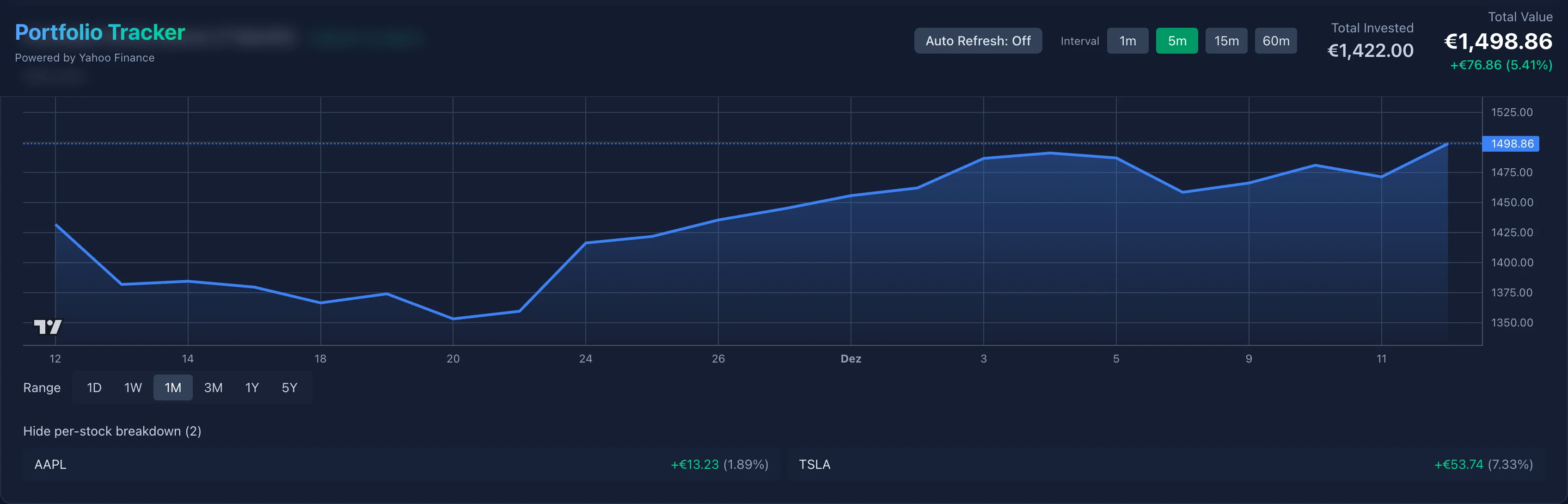
Interactive chart showing selected range and per-stock breakdown; this view updates when ranges change.
- Update local
rangestate and callsetSelectedRangein the store so the global selection reflects the UI. - If the store’s
refreshPortfolioRangeis available, check whether anyPortfolioItemalready has thetargetRangerecorded infetchedRanges. - For
1Madditionally check whether the item’shistoryearliest date is at-or-before the 1M cutoff (UTC-normalized); if yes treat it as covered. - If none of the items cover the range, call
refreshPortfolioRange(targetRange)which will fetch missing history and updatefetchedRanges.
const handleRangeChange = async (targetRange: Range) => {
	setRange(targetRange); setSelectedRange?.(targetRange);
	if (!refreshPortfolioRange) return;

	const anyHave = portfolio.some(p => {
		if (Array.isArray(p.fetchedRanges) && p.fetchedRanges.includes(targetRange)) return true;
		if (targetRange === '1M' && Array.isArray(p.history) && p.history.length > 0) {
			// compute earliest timestamp robustly
			const earliestTs = Math.min(...p.history.map(h => Date.parse(h.time + 'T00:00:00')));
			const cutoff = getRangeCutoff('1M');
			return Date.UTC(new Date(earliestTs).getFullYear(), new Date(earliestTs).getMonth(), new Date(earliestTs).getDate())
				<= Date.UTC(cutoff.getFullYear(), cutoff.getMonth(), cutoff.getDate());
		}
		return false;
	});

	if (!anyHave) await refreshPortfolioRange(targetRange);
}
Merge Histories
The function below ensures merging two history arrays yields a sorted array without duplicate date entries:
function mergeHistories(oldH?: Candle[], newH?: Candle[]): Candle[] {
	const map = new Map<string, number>();
	(oldH || []).forEach(c => map.set(c.time, c.value));
	(newH || []).forEach(c => map.set(c.time, c.value));
	return Array.from(map.entries()).map(([time, value]) => ({ time, value })).sort((a,b) => a.time.localeCompare(b.time));
}
The table view shows merged history rows (per-day candles) for each item. mergeHistories ensures rows are unique by date and sorted chronologically; this table is used both for exports and for quick manual inspection when users import JSON.

Merged history table used for export/import and quick inspection.
Auto-refresh and background updates
The app includes an optional auto-refresh feature that updates quotes and short-range history in the background. Goals for this feature were:
- Keep UI responsive: update data in the background without blocking user interactions.
- Minimize network usage: only fetch updates for ranges that are considered “fresh” (short ranges like
1D/1W) or when items explicitly need a refresh. - Avoid redundant requests: respect
fetchedRangesand the history-based coverage check described earlier.

App header and controls: range buttons, add-stock and status indicators (responsive).
Design notes:
- A lightweight polling loop runs when the app has focus and the user has enabled auto-refresh. It calls a
refreshPortfolio()function periodically (configurable interval, e.g. 60s). refreshPortfolio()fetches quotes for all items and optionally fetches short-range history (for example1D) only if the item does not already have a recent timestamp or iffetchedRangesdoes not include that range.- The UI shows a subtle status indicator while background refreshes are in progress; individual components update when the store writes new data.
Simplified code snippet (store polling + guarded refresh):
// in StoreProvider
useEffect(() => {
	if (!autoRefreshEnabled) return;
	let cancelled = false;
	const tick = async () => {
		if (cancelled) return;
		try {
			await refreshPortfolio({ onlyShortRanges: true });
		} catch (e) { /* swallow non-fatal errors */ }
		if (!cancelled) setTimeout(tick, AUTO_REFRESH_INTERVAL_MS);
	};
	tick();
	return () => { cancelled = true; };
}, [autoRefreshEnabled]);

// refreshPortfolio guarded by fetchedRanges
export async function refreshPortfolio(opts?: { onlyShortRanges?: boolean }) {
	const rangesToRefresh = opts?.onlyShortRanges ? ['1D'] : ALL_RANGES;
	for (const p of portfolio) {
		for (const r of rangesToRefresh) {
			if (Array.isArray(p.fetchedRanges) && p.fetchedRanges.includes(r)) continue;
			await refreshStock(p.id, r);
		}
	}
}
Notes:
- The polling loop is intentionally conservative: it only requests short-range data by default to keep bandwidth low.
refreshStockandrefreshPortfolioappend the fetched range tofetchedRangesso subsequent cycles skip already-covered ranges.- Errors in background refreshes are logged and do not interrupt the UI; a user-facing error flow is only triggered for foreground actions initiated by the user.
Testing and verification
- The repo uses Vitest + Testing Library for unit tests. Important tests include verifying
importPortfoliobehavior,refreshPortfoliocaching logic, and the updatedfetchedRangespersistence for1M.
How to run locally
git clone https://github.com/ammarnajjar/portfolio.git
cd portfolio
npm ci
npm run dev
Building this project showed me that the interesting problems start once the basics work: caching, persistence, and keeping the data fresh without annoying the user. If you have built a personal tracker for your own metrics, what did you measure first?